If you’re a Type B teacher like me it may have never occurred to you to organize your IEP and lesson planning information into one binder, especially as a self-contained teacher. Let me be the first to admit that I needed this system more than I thought I did. I used to just have all my information in my email, digital calendar, and Google Drive and thought it would be enough, but having a place where all the information could be at my fingertips, in the same format, organized together for each student has been a game changer. It saves me so much time to not have to hunt down everything and have it all at my fingertips in one binder.
Enter the Special Education Teacher Planner. This little binder has all the things I need as a self-contained special education teacher and none of the things I don’t. I never felt like the other special education teacher binder systems really fit the needs of a self contained classroom; our needs are so different for organizing! This is what is included in my planner and how I use it to stay on top of things during the school year and feel more confident and organized going into busy IEP season.
IEP Info
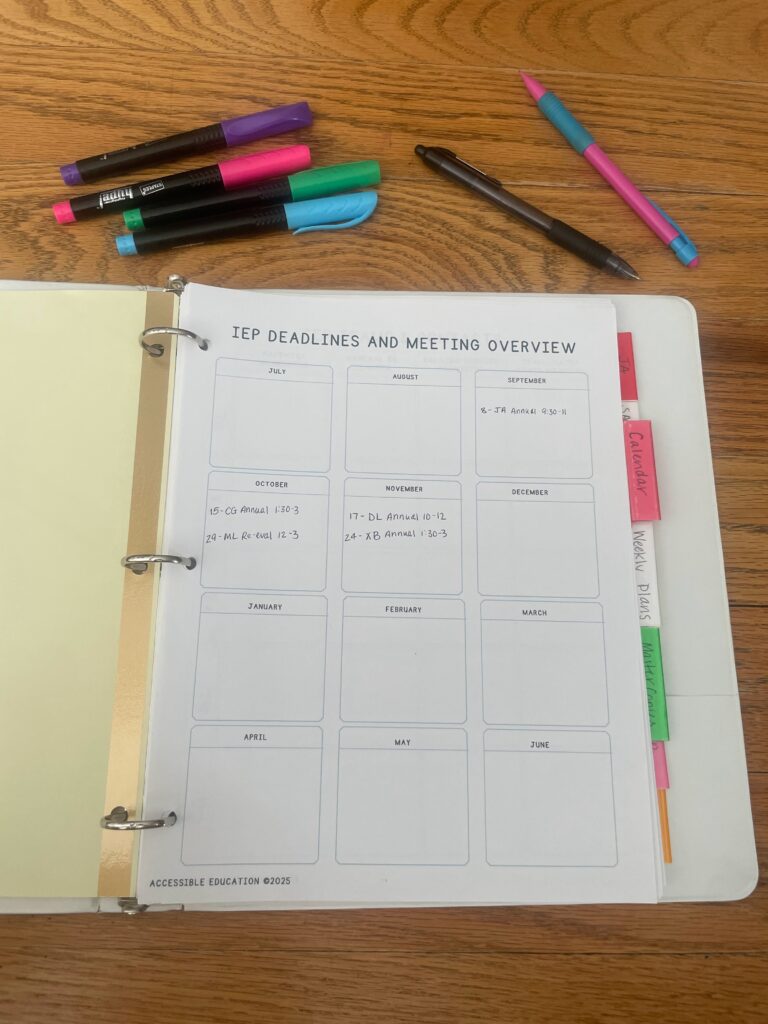
The first and most used section is where I keep all the IEP deadlines and meeting information at a glance. This one sheet of paper lets me see what meetings I have coming up for the whole year. I don’t like to put anything else on this section of the special education teacher planner because I really only want to focus on when I have a meeting coming up. My district schedules meetings 2-3 months in advance so at the beginning of the year I don’t always have this filled out, but I can at least feel confident stepping into the first month of school what is coming and what meetings I need to prepare for.
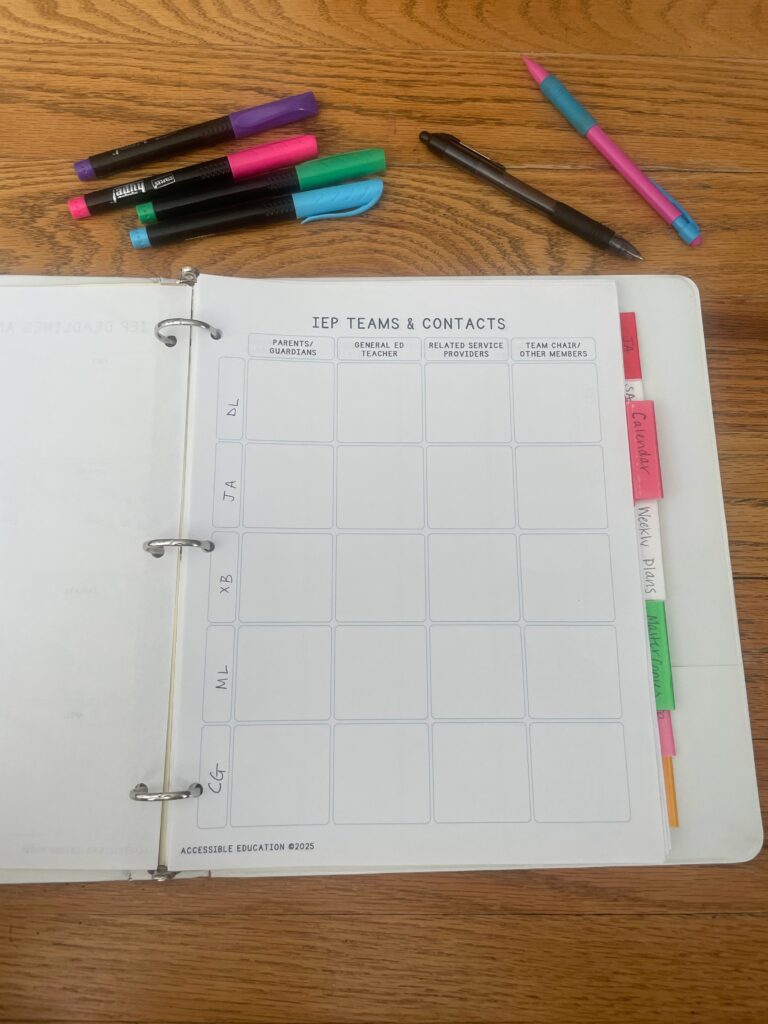
The next page is where I organize all the IEP teams and contact information. If your students are like mine, they have 2-4 related service providers and because they span different grade levels there are different meeting team chairs to keep track of. This helps me see at a glance who is on everyone’s team. I like to put the parents and guardians and their contact info, who the general education teacher is, who the different related service providers are, and then the team chair and other people who are affiliated with this student (outside ABA, for example). If you work in a district where the special education teacher is responsible for sending out notices and invitations, this will help tremendously when it comes time to send out all the invites because you can just flip to this page and have all the emails in one spot rather than digging through old emails and old IEPs to get all the info.
Calendar Pages
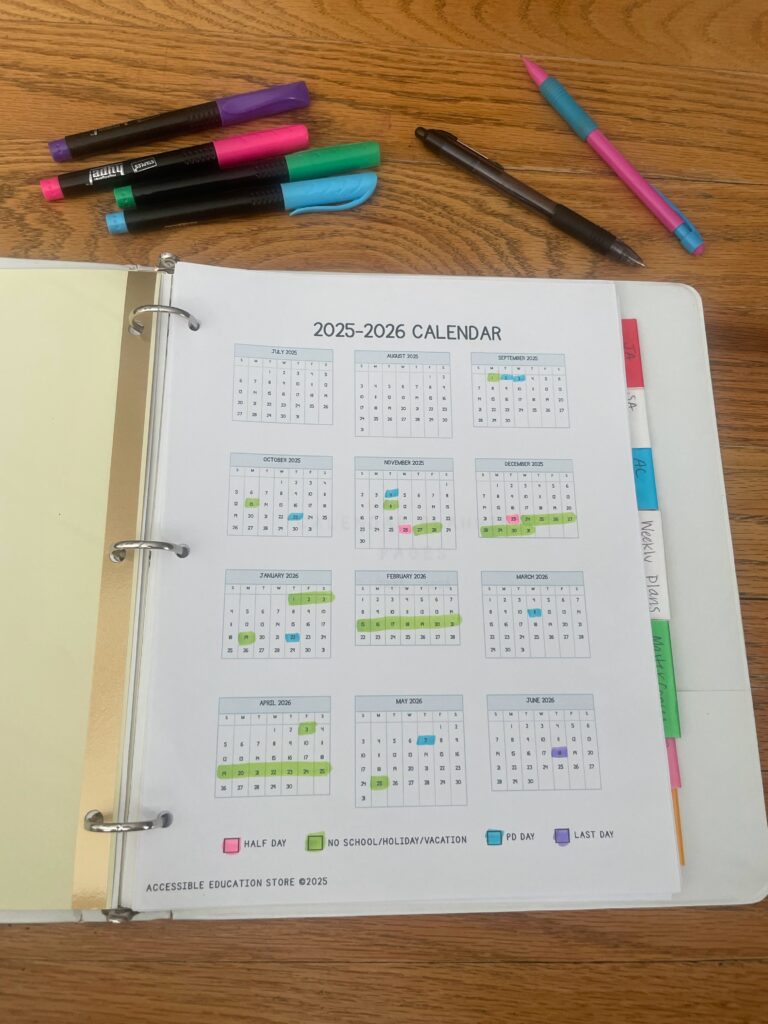
The next section in my binder is for calendar pages. I start with a year at a glance and fill in when half days, vacation days, and PD days are during the year. This way, when I’m in an IEP meeting and we need to set a time to meet again or reschedule, I can easily see when it is possible and when it isn’t without needing to pull out my laptop. If there are other important dates that need to be remembered like a school-wide assembly or a field trip day, I’ll either add it to this page or the month at a glance pages.
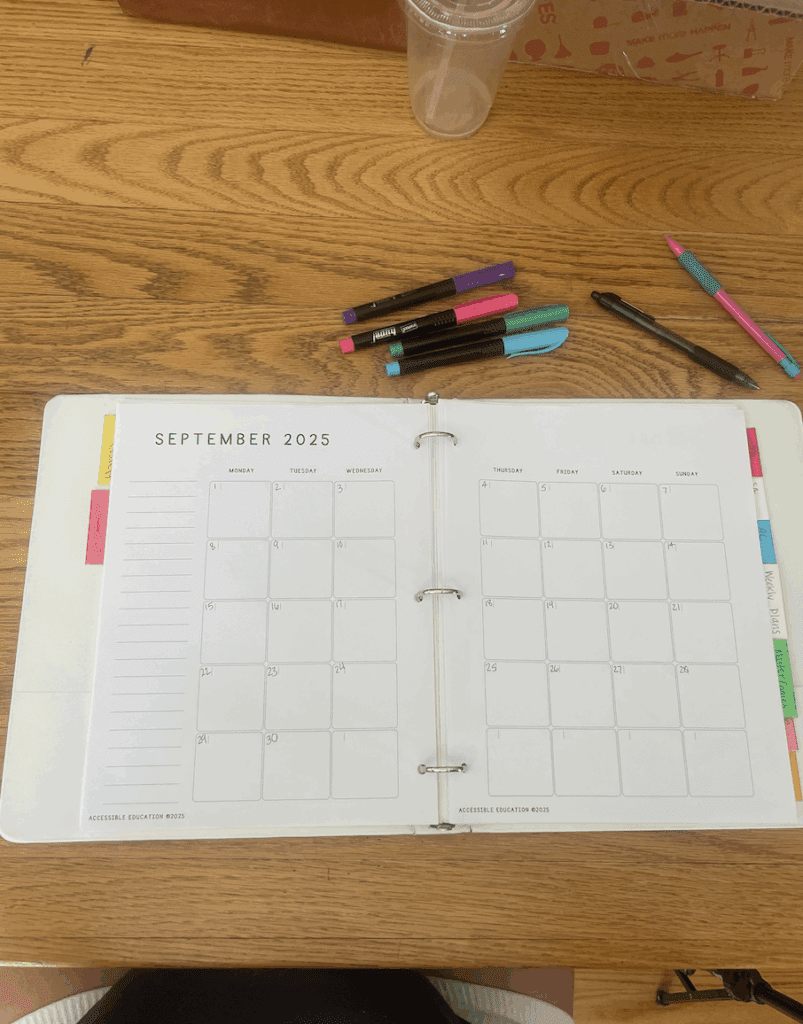
Speaking of month at a glance, that comes next in my special education teacher planner. I print the pages to be double sided so I can open up to an entire month at one time. After I’ve added the dates, I go ahead and fill in each calendar with student & staff birthdays, spirit days, IEP meetings, PLCs, etc. Writing down when you have planning or collaboration meetings will also help if you need to document consultation time for a student’s IEP or for your licensing information. I can’t tell you how many times I end up using this section of the planner- it comes in handy for meeting planning, scheduling consult time, organizing field trips, etc. It really is the workhorse of the planner!
Weekly Plans
In this section, I start off by putting my Week-At-A-Glance Schedule. It shows where I’m supposed to be and who I’m supposed to be working with for every day of the week. I like to have this schedule here so that when I’m building my weekly plans, I have a quick reference for what comes next during the day or what changes I need to make to different days of the week depending on my schedule.
Next comes the weekly planning pages. I didn’t use to do this because I thought, we’re a self-contained classroom, we don’t have lesson plans the same way other teachers do but I’m so glad I made the switch to looking at my week this way. For each week, I break up the plans by day and by blocks that are meaningful for our classroom. This allows me to open up to one week and plan what our AM center focus will be, what independent work will look like for the week, what we’re doing for social studies or science, what our daily craft will be, etc. Not only does it keep me organized and focused, but if I’m ever out I can just tell the sub or paraprofessionals to look at the weekly plan for that week and they will know what to set up for each section of the day. This part of the planner can be as detailed or general as you need it to be, the key is finding what works for you so you will actually use it! You can also submit this to your building admin if they have a policy for sub plans.

Master Copies
I also include a section for master copies because it is way easier to just copy a pre-printed page rather than having to find a digital PDF, finding the specific page, and re-printing it. The master copies I keep in this section are:
- Consultation and communication log: For each student I keep a running log of when I provided consultation time. When I wasn’t writing this down, it really got away from me and if an advocate were to ask to see if we were in compliance for consultation minutes I would be scrambling to put something together. These logs are very simple- every time you have an email, phone call, or in-person meeting about a student with a parent or related service provider you record it on this sheet including who you spoke with and the topic discussed. I tend to not record emails because I have a digital record but some people like to.

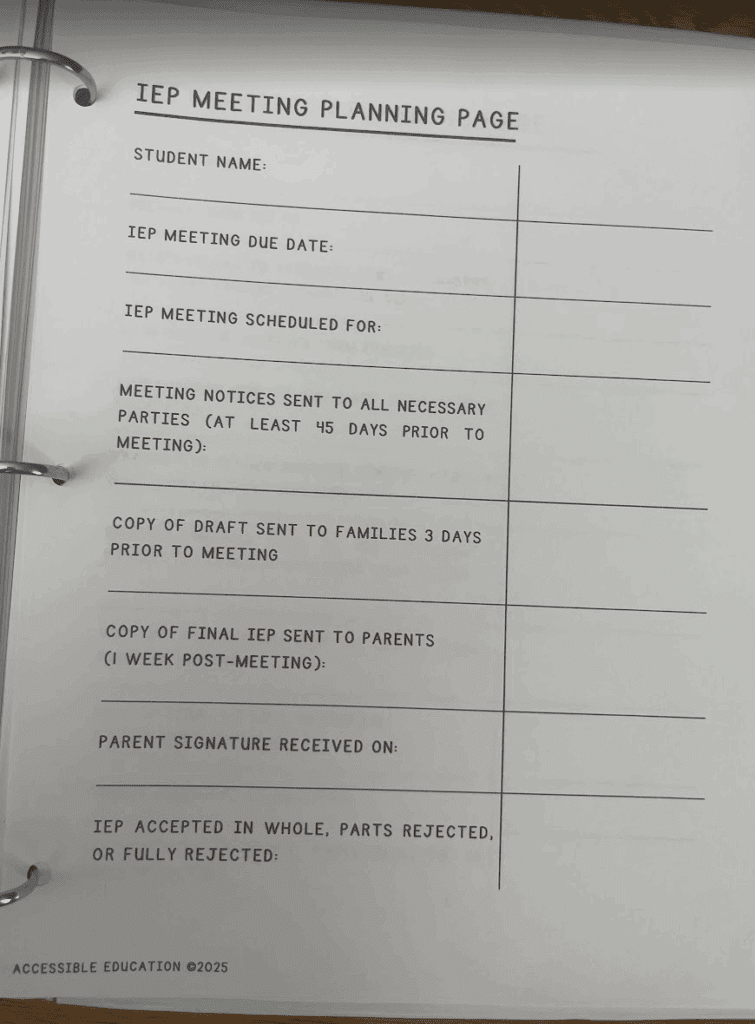
- IEP Meeting Planning Pages. These are SO helpful when it comes to organizing all the meeting notices and invites required to be in compliance. Each of the worksheets takes you through the process of planning an annual, initial referral, or a reevaluation to be in compliance with when notices need to be sent out, when consent needs to be obtained, when you need to schedule a meeting by, etc.
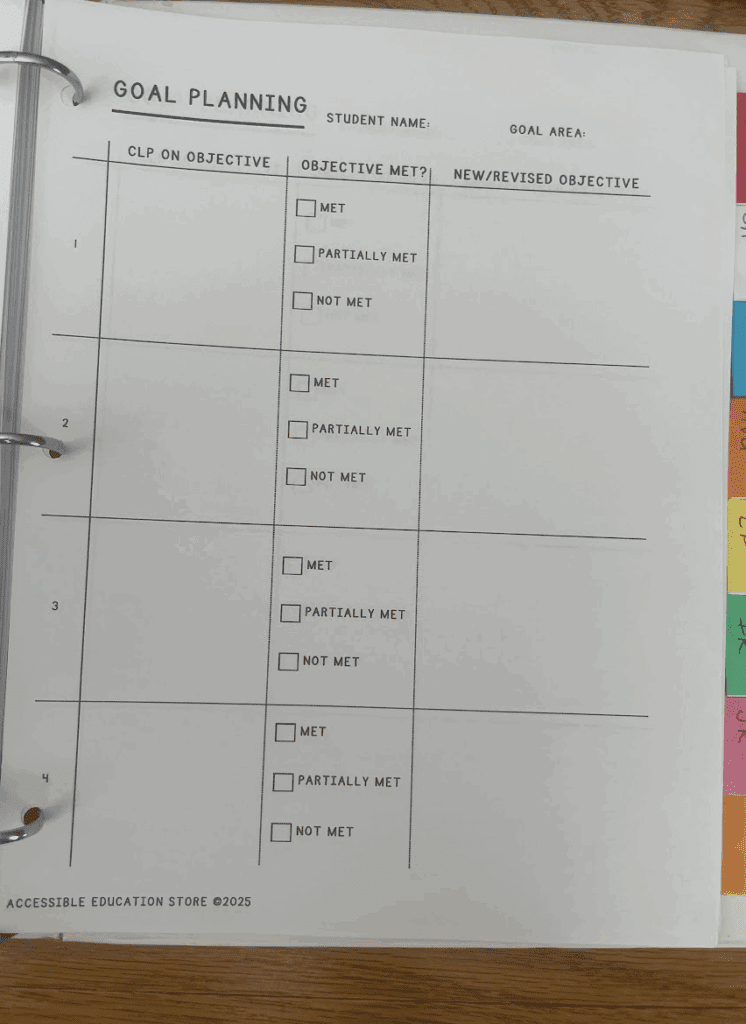
- Goal Planning Sheet. These worksheets help me plan and organize goal writing so that I am basing new objectives on current level of performance and what the student previously mastered. When I’m ready to plan an IEP for a student, I make copies of these sheets for each goal area. I then write out the student’s current level of performance for each objective. I can easily see with it all written out if the student met, partially met, or did not meet the objective which will help me see what we need to work on next. Planning it this way will help teams see the connection between the new and old objectives- remember the goal of IEP writing is to have some invisible string that connects the student’s profile to their accommodations, goals, and service delivery.
Student Tabs
The last section I have behind all those tabs are tabs for each of the students on my caseload. Each student gets a tab where I organize their IEP goal planning sheets, timeline sheets, their schedules, BIPS, consultation and communication logs, and other important information like medical summaries. This helps me stay organized for meetings when teams have questions about something or I need to quickly reference student info. I don’t keep IEPs in here because this is a binder that travels with me a lot throughout the school but I will sometimes do a summary sheet of a student’s goals or accommodations for a quick reference.
That’s everything! I wanted a system that was simple and easy to put together, and it has served me well for several years. Getting all the dates and planning pages together takes me maybe 30 minutes at the beginning of the year and then I can easily add to it and make copies of the necessary pages needed throughout the year. This system makes planning for a special education teacher very simple and straightforward, I just wish I had started using it sooner. You can find these planning pages in my TPT storefront here. Do you need ideas on how to set this up to meet your needs? Send me a message here!